

The digital transformation of schools is not just a matter of devices: it concerns methods, timing, assessment, and the educational relationship. For teachers, the challenge is to choose innovative digital tools that make teaching more effective without increasing workload or compromising inclusion and privacy. In this article we look at how to navigate platforms, content creation, data-driven assessment, and new opportunities linked to AI, with a practical focus on digital teaching, teacher tools, and educational technology.
Why digital teaching is changing school (and what teachers need)

Digital teaching is changing school because it responds to real needs: continuity between in-person and remote learning, greater personalization, access to up-to-date resources, and the ability to document processes and progress. But digital only works if it is guided by clear pedagogical choices. The point is not “doing everything online,” but using educational technology to improve learning, participation, and inclusion.
To adopt tools sustainably, teachers need a few practical conditions. First of all,explicit learning objectives: what do I want students to learn and how do I measure progress? Then, pay attention toinclusion and accessibility(usable materials, readable fonts, text alternatives, appropriate timing). Third,privacy and data protection: choose tools that comply with school policies, minimize sensitive data, use institutional accounts when possible. Finally, you needdigital skills and organizational support: targeted training, time for experimentation, and a “stable” set of tools to avoid fragmentation.
A useful criterion is to ask yourself: does this tool reduce friction (submissions, communications, archiving), increase evidence (learning traces), and improve the quality of feedback? If the answer is yes, it’s a good candidate to become part of your teacher-tool ecosystem.
Platforms and learning environments: LMSs, virtual classrooms, and collaboration
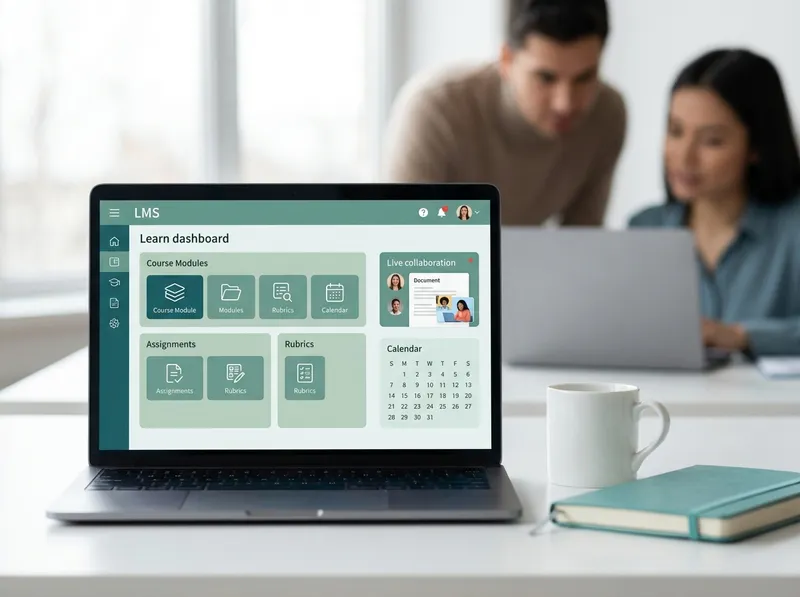
A well-configured LMS (Learning Management System) or virtual classroom becomes the “center of gravity” of digital teaching: it hosts materials, assignments, communications, and feedback/returns. The goal is to reduce the chaos of links and parallel chats, offering students and families a single place to find instructions, deadlines, and assessment criteria.
To make the environment effective, work on three levels:structure(coherent modules, clear naming),routines(where to submit, where to ask for help, when feedback arrives) andcollaboration(shared documents, forums, group work with roles). Collaborative suites make it possible to co-write, comment, track revisions, and build final products (reports, maps, presentations) with more transparent assessment of the process.
Examples of simple but high-impact activities:
- Course board with a “typical week”: objectives, essential materials, a short task, a self-assessment moment.
- Group work on a shared document with roles (researcher, reviewer, layout editor) and submission with final version + revision history.
- “FAQ” forum: students answer each other, the teacher validates and collects recurring mistakes for the next lesson.
Selection criteria: integration with institutional accounts, simplicity for students and families, ability to export data/materials, accessibility tools, and a good balance between features and complexity. A “perfect” LMS that is hard to use leads to abandonment; better an essential, coherent solution that remains stable over time.
Content creation and interactive lessons: video, presentations, quizzes, and gamification
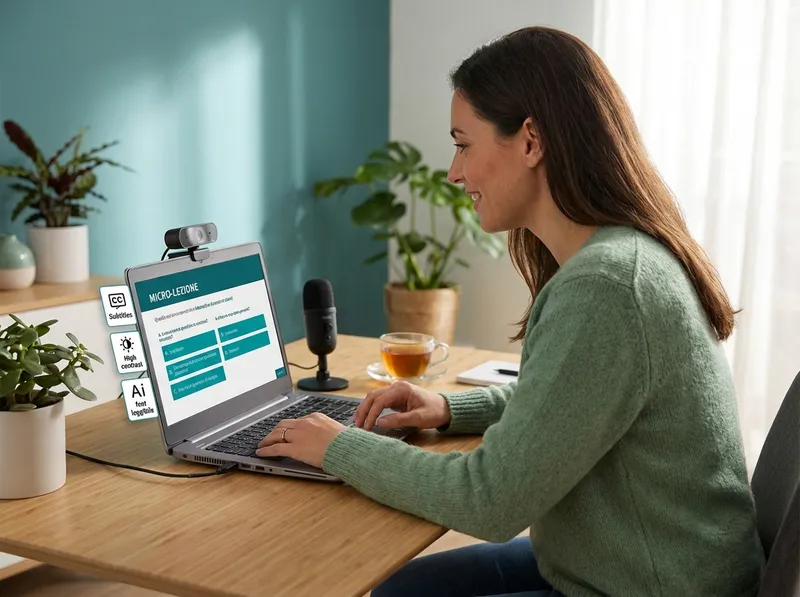
Producing digital content can become a time “black hole.” The best strategy is to focus onshort, reusable, and modularresources: 3–7 minute micro-videos, essential slides with guided examples, worksheets, and quick quizzes to check understanding. This way you can update one piece at a time and build differentiated pathways without redoing everything every year.
For interactivity, alternate moments of presentation and action: a closed-ended question to “hook” attention, a short exercise to apply, a guided discussion with examples of typical mistakes. Gamification works if it is tied to clear objectives: levels that correspond to competencies, badges for measurable milestones, collaborative missions (not just individual competition).
Don’t forgetaccessibility: subtitles or transcripts for videos, high-contrast text, images with descriptions, instructions in clear language, and assessments compatible with assistive/compensatory tools. Accessible content is often also more understandable for the whole class.
Data-driven assessment and feedback: rubrics, analytics, and digital tests

Digitizing assessment doesn’t just mean “doing online tests.” The real leap happens when rubrics, feedback, and data become a continuous improvement loop.Rubricshelp make criteria and levels explicit, reducing ambiguity and making grading fairer. If integrated into the LMS, they speed up feedback and allow the student to understand “what to improve,” not just “what grade I got.”
Analytics (participation, submissions, item-level results) should be read with caution: they are indicators, not verdicts. Use them to identify patterns: which concepts generate the most errors? Who doesn’t submit regularly? Which activities have higher engagement? From there you can design targeted recovery and enrichment interventions, for example reinforcement mini-lessons, graduated exercises, or peer-tutoring groups.
For feedback, prioritizetimeliness and actionability: few comments but specific, linked to the rubric, with a clear next step (“revise the introduction by adding an explicit thesis,” “check units of measure and steps”). Digital assessments can include auto-graded questions for the basics and open-ended tasks for more complex competencies, maintaining a balance between efficiency and depth.
AI and personalization: how StudierAI can support modern teaching

AI can become a concrete ally for teachers, especially in the most time-consuming phases: planning, differentiation, and preparing materials. A solution likeStudierAIcan support modern teaching if used with a professional approach: you define objectives, class context, and criteria; AI speeds up the production of drafts and variants, which you then validate and adapt.
Useful use cases in everyday practice:
- Plan units and lessons: sequence of activities, timing, guiding questions, authentic tasks, and success criteria.
- Differentiate materials: three complexity levels of the same exercise, simplified versions of the text, concept maps, and subject-specific glossaries.
- Generate quizzes and quick checks: sets of questions with sensible distractors, recovery exercises on typical mistakes, grading grids.
- Support feedback: examples of formative comments linked to the rubric, improvement suggestions, and personalized study plans.
If you want to experiment gradually, you canstart for freeand test a simple flow: lesson objectives → differentiated activities → exit quiz → assessment criteria. This way AI becomes an accelerator, not a substitute for teachers’ work.
Theethical and transparencyaspect also remains central: state when AI was used to generate drafts, check accuracy and bias, avoid entering students’ sensitive data, and keep final responsibility for instructional choices. If you are considering ongoing use, consult theplans and pricingto understand which solution best fits the needs of your department or school.
In summary, digital teaching is effective when it combines reliable tools, clear routines, and competency-centered planning. Choose a few educational technologies, use them well, measure what matters, and invest in feedback and inclusion: that’s how teacher tools become real levers of quality, not simple “add-ons” to the curriculum.
